Art Institute of Chicago Slide Puzzle
A Coghack #23 Project
May 18, 2023
If you want to jump straight into the fun click here to play it for yourself, or if you want to get straight to the code, you can browse that on GitHub.
Read on for the gritty details of the day.

For this Cogapp hack day, which was in collaboration with the Art Institute of Chicago, I wanted to leverage the Institute’s image server and the HTML Drag & Drop API to create a IIIF-powered slide puzzle, with the idea of placing it on the 404 page of the AIC website.

The plan
- Get random image from API.
- Chunk image into tiles for grid whilst noting the original position (i.e. ‘solved’ position of tiles).
- Shuffle all tiles & replace one with the movable tile whilst tracking the current position of each tile.
- Implement Drag & Drop API logic to handle the user actions; updating the current position of tiles as they are moved.
- On completion of the puzzle, display the full image.
Get a random image
Thankfully the Art Institute of Chicago’s API documentation is very thorough, which meant it took very little time to get my hands on a random image from their collection.
Their /artworks/search endpoint accepts an Elasticsearch query directly, so I could randomly set an offset & limit to one result. With one request I could get the title of the artwork, the artist name, the image ID, and the relevant IDs to construct links to the actual page for the artwork & artist.
Generate the tiles
Before generating the tiles, I needed to set two parameters; the dimensions of the entire puzzle and the number of tiles per side, e.g. a 2x2 grid = 4 tiles.
I chose a 600px square because there are lots of factors, so we could cleanly generate a 2x2, 3x3, 4x4, 5x5, and a 6x6 grid (these will come in later as the “difficulty” setting).
First step, get the raw dimensions of the random image. This is where the IIIF API comes in. The API docs explain how to reach their Image API, so it was pretty much a case of plugging in the image ID from the first step to retrieve the info.json for the particular image.
In this case, you can the see specific info.json for the image here.
There’s lots of information about the image, but what needed was the full dimensions, which are handily under the width and height keys:

A snippet of the info.json
With these two numbers, I know if the image is portrait (height > width) or landscape (width > height).
Calculate the cropped image
Note: this is not how my code calculates the crop, but in the course of writing this post I realised this is how I should’ve done it. The end result is the same.
As above, we want a 600px square from this image. I could’ve forced the API to return this, but this would’ve given an image that didn’t respect it’s original ratio:

Instead, I could request an image starting at the top left corner, with a length & width equal to the shortest edge, which would guarantee a square (i.e. 7456 x 7456px). The IIIF spec explains that we could pass these as a region in terms of its raw dimensions, then request a 600px wide image via the size parameter:

Generating the tiles
Chunking these into tiles is then trivial because we’ve defined the number of tiles per row (which is the same as tiles per column), so it’s a case of dividing the raw dimensions. An an example the tiles in a 2x2 grid would be:
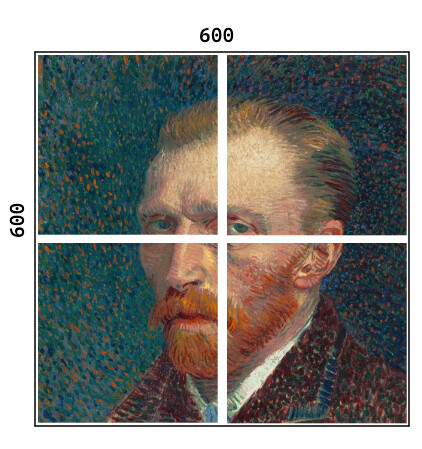
We need to note to the initial position of each tile (this is the same as the solved position). I used data attributes as a way to keep track of metadata for each tile. As part of the initialisation process I calculate the coordinates of each tile and assign that as data-solved-coord on each image element.
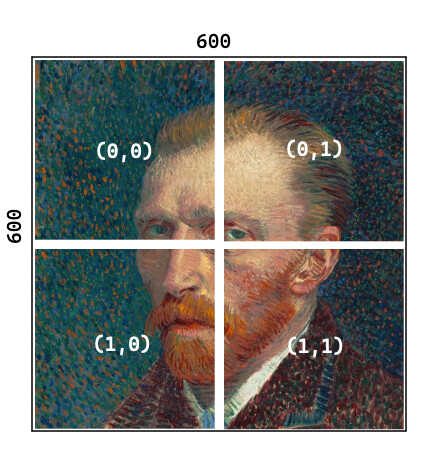
The coordinate system
Then we can replace the last (bottom-right) tile with a placeholder to indicate the movable tile, and shuffle the tiles.
This was easier than expected, because of the behaviour of appendChild() :
“if the given child is a reference to an existing node in the document, appendChild() moves it from its current position to the new position”
All this meant I could target the puzzle container div, get its childNodes (the image tiles) and append each of the existing children in a random order back to that same container (see the snippet here).
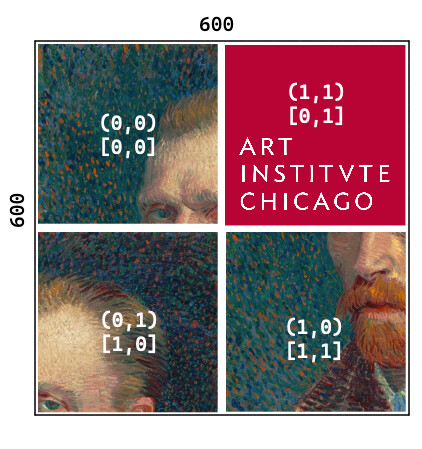
A shuffled puzzle
In the above, the solved coords are in round brackets, and current coords are in square brackets.
Drag & Drop API
For technical details on the Drag & Drop API, the MDN docs are a great starting point, and they explain the workings far better than I can.
Now we’ve got a random image (& metadata) from the API, we’ve cropped the image to a square, calculated the region for each tile, created our ‘slide’ piece, and shuffled the tiles. We just need to implement the drag & drop logic, which will also update the current state of our puzzle.
The behaviour we want is that the sliding piece is only allowed to swap with one of the tiles adjacent to it, not those diagonally. Knowing the number of tiles per side, and the current coordinates of the sliding piece, we can generate a list of candidateCoords which is our list of valid moves, an example:

The four valid moves from the central tile on a 3x3 grid
To communicate to the user that they’re hovered over a valid move, we have an event listener on the dragenter event, which checks if the target tile is in the valid set of candidateCoords for the dragged tile, and if so, adds a CSS class to style the target tile with a white box. This class gets removed on dragleave (i.e. hovering over a different tile) & dragend (i.e. releasing the mouse).
Finally, to manage the state of the puzzle, when the user drops our draggable piece over a valid candidate and ‘drops’ the tile, we call the swapTiles function, which swaps the coordinates of the tiles, then sorts the array of tiles into the new order, and also an updateProgress function which tells the user how close to completing the puzzle they are by comparing the current vs solved coords of each tile.
Bringing it all together
The goal of this hack day was to experiment with the IIIF image API and the Drag & Drop API, both of which were (thankfully) really easy to prototype with.
In the course of this day I realised how frustrating I find these puzzles, as evidenced in this short video of me clicking around until I solved it:
See if you’re better at solving it than I am by playing for yourself here: https://cogapplabs.github.io/aic-slide-puzzle/ or check out the code on GitHub.