What makes a good game for an art museum website?
November 9, 2023
Online games have not been common on art museum websites but we are seeing our clients and community starting to experiment. As this process gets underway, it raises the question: ‘What makes a good game for an art museum website?’
Earlier this month Cogapp ran a hack day to explore this question with our friends and clients at the National Gallery of Art in Washington D.C. They have already had good success with their Artle, art discovery game.

Screenshot from NGA’s Artle — an example game (play it here)
Several of my Cogapp colleagues worked on prototype applications. I spent the day sketching out ideas.
My work produced four ideas (described below), which in turn led me to some tentative general conclusions.
Key criteria for games on an art museum website
Based on what I saw during our hack day and what I’ve seen elsewhere, here are some suggested criteria for online games for art museum websites:
Necessary Criteria
Most of these are pretty obvious, but perhaps worth stating as a checklist.
- Relevant
Any game should be relevant in terms of content — ideally directly related to museum programmes and/or content including especially your museum’s collection.
2. Aligned with the organisation’s mission
Most art museums have as part of their mission some version of the BBC’s mission:
““to act in the public interest, serving all audiences through the provision of impartial, high-quality and distinctive output and services which inform, educate and entertain”.”
Does your game idea align with something like this?
3. Consistent with the organisation’s values, brand and identity
This is obvious.
4. Accessible
User interfaces for games often involve more complex controls than standard web pages and that raises issues of accessibility. Any game implementation will need to be able to meet your organisation’s accessibility standards.
Nice-to-Have Criteria
These criteria all come out of what I learned on our hack day.
- Mutually beneficial
In an ideal world, the game should benefit (i.e. inform, educate and/or entertain) the player. It should also serve the interests of your organisation.
For example, it could help to build a deeper relationship with the player, perhaps by encouraging them to subscribe for updates or explore the organisation’s online content more deeply. It could provide valuable insight into visitors’ interests via analytics. At the most obvious level, you could solicit players for donations.
2. Inclusive for the general visitor (not too nerdy)
Art museums can seem daunting to the general visitor. It would be a shame if your game reinforced the belief that only art historians are really welcome.
3. Shareable
You probably want people to share your game with others (and encourage them to do so).
4. Creative/open-ended
The best kind of game opens people’s eye’s to new possibilities in relation to art and helps them to see (or make) art in new ways.
5. Generous
Art museums are at their best when they give generously to the world. Your game could feature and promote other organisations’ content or you could make it open source so that others can adapt it.
Example Game Ideas
Here are the ideas I worked on during our hack day.
Progressive Jigsaw Puzzle
Jigsaw games are a pretty obvious idea for art museums and have been extensively explored.
In this concept, the jigsaw is presented in stages: a very easy first version followed by progressively harder versions using the same image. This might be more engaging if the first level version was quite blurred and then each level after that was less blurred until in the hardest version you get a very high resolution version.

Blurred image of Bellini and Titian’s ‘The Feast of the Gods’ (find out more)— first stage of a progressive jigsaw puzzle

Progressive jigsaw idea: Bellini and Titian’s ‘The Feast of the Gods’ (find out more) as a jigsaw
Twisty Picture Puzzle
A twist, quite literally, on the jigsaw idea. Instead of moving pieces around maybe you could use controls to reset an image that has been deconstructed or distorted in some way.
The NGA’s Watson and the Shark provides a pleasingly surreal experiment.

Twisty picture puzzle: John Singleton Copley’s Watson and the Shark (find out more)
There are many possible variations on this idea: sliding bars; colour adjustment controls; you could combine elements of two artworks and ask the player to unscramble them; and so on.
Immersive Online Experience

Sketch for an immersive online experience: Albert Bierstadt’s Mount Corcoran (find out more) landscape with audio button
More an experience than a game, the concept here is to present a high resolution (zoomable?) image of a large-scale landscape accompanied by an immersive audio field recording soundtrack.
In this case, the proposal is to combine Albert Bierstadt’s Mount Corcoran landscape with a field recording made in a similar location at a similar time of year by the legendary Bernie Krause (find out more).
In a similar neck of the online woods, the V&A have done some successful experiments with ASMR video.
“ASMR stands for autonomous sensory meridian response; a term used to describe a tingling, static-like, or goosebumps sensation in response to specific triggering audio or visual stimuli. These sensations are said to spread across the skull or down the back of the neck and, for some, down the spine or limbs.”

https://youtube.com/playlist?list=PLe2ihXndm5jseo_RGEGeEbPy09z0nlmZE&feature=shared
Some of these videos have attracted large audiences (> 1 million plays).
Assets for Scratch
Finally, perhaps the most radical (and best?) idea.
Don’t make a game!
Instead, publish assets that other people (especially children) can use to make games.
Scratch is a well known platform (developed by MIT) that children use to learn programming (online here). It’s very simple and well adapted to making games.
Scratch is object oriented, games involve giving graphic objects (still or animated) programmed behaviours and interactions.
So what better source of lovely material for children’s games than your art museum collection? The illustration below shows some of the material I found in an hour or two browsing the National Gallery of Art’s online catalogue.

A sample set of NGA images for making Scratch games
The cut-out images were produced using an online service called PhotoScissors. It worked pretty well — higher resolution cut-outs are available for a fee. There are many alternatives.
Scratch games are more fun if the elements are animated. I had a quick go at producing an animated gif for Mr Punch. Somebody who knows what they are doing could produce a much better result.
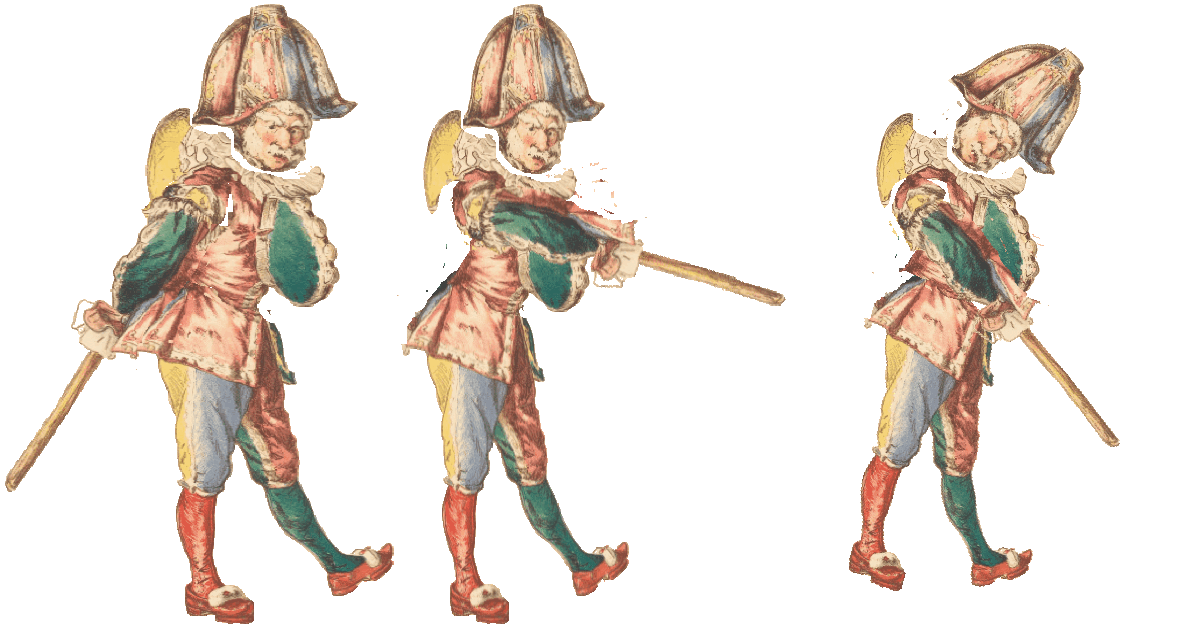
Animated Mr Punch — original by Manet from the collection of the National Gallery of Art (nga.gov)
Conclusions
In conclusion, this feels like a bit of a moment.
The success of lightweight online games like Wordle opens up new possibilities and art museums could well take advantage.
Of all the ideas suggested here, I think the most impactful would be the Scratch assets project. It exemplifies all our principles, it benefits children, a key and often under-served audience group, and is infinitely extensible.
Let’s see if we can persuade an organisation to give it a go.
Next Steps
If you would like to learn more about, or follow up on, anything touched on in this article please get in touch via the contact form on our website.